I issue quotes quickly
Give me a quote on 20 units.
- Start from scratch, a quote template or the customer’s past sales
- Apply the customer’s price automatically
- Check stock and add freight while they wait
- Send, accept, pay and create the order


Quoting software
Build an accurate, on-brand quote while the customer is ready to buy. Check their price, stock and freight, send it for approval, then create the order without re-keying the sale.
Loved by Australian and New Zealand customers





Sometimes it’s a simple “how much is it?”. Other times it’s a long conversation over weeks or months. However your business sells, Tall Emu keeps the quote, customer and next step together.
Give me a quote on 20 units.
It’s a big decision. We’ll present a few options and catch up next week.
Sometimes it’s fast. Sometimes it takes a bit longer.
The quickest useful quote gives the customer a price they can act on, with the right stock, margin, freight and next step already worked out.

Apply their normal price type, special product price and quantity breaks automatically. See what they’ve bought or been quoted before.
See available stock at the chosen location, so the salesperson can say what can be supplied now instead of promising stock that is already spoken for.
See cost, selling price and expected margin before the quote is sent. Control which users can see cost or change the price.
Quote freight while building the sale and give the customer one complete delivered price.
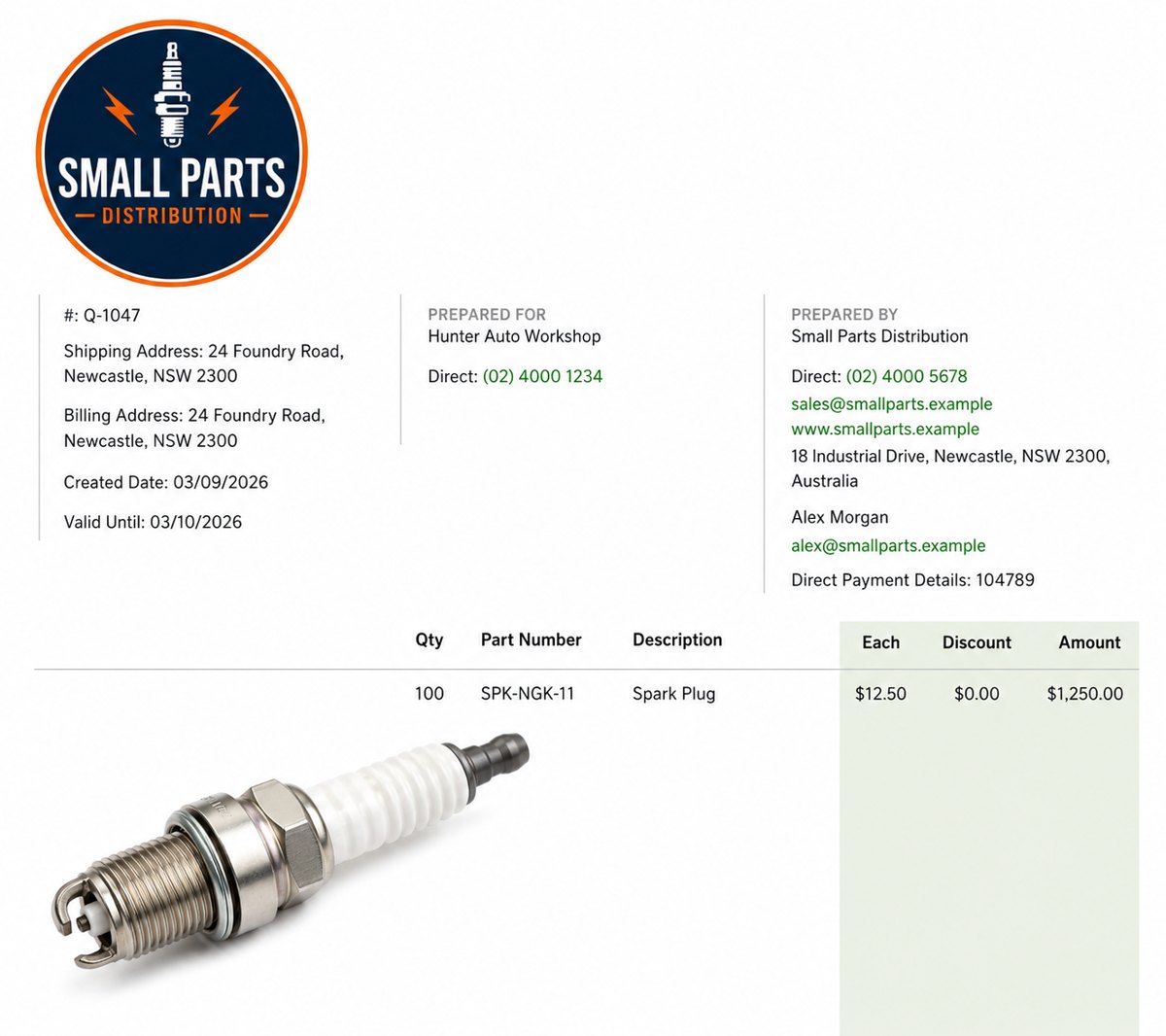
Send a branded online quote or PDF. The customer can review the terms, ask questions, accept, sign and pay online.
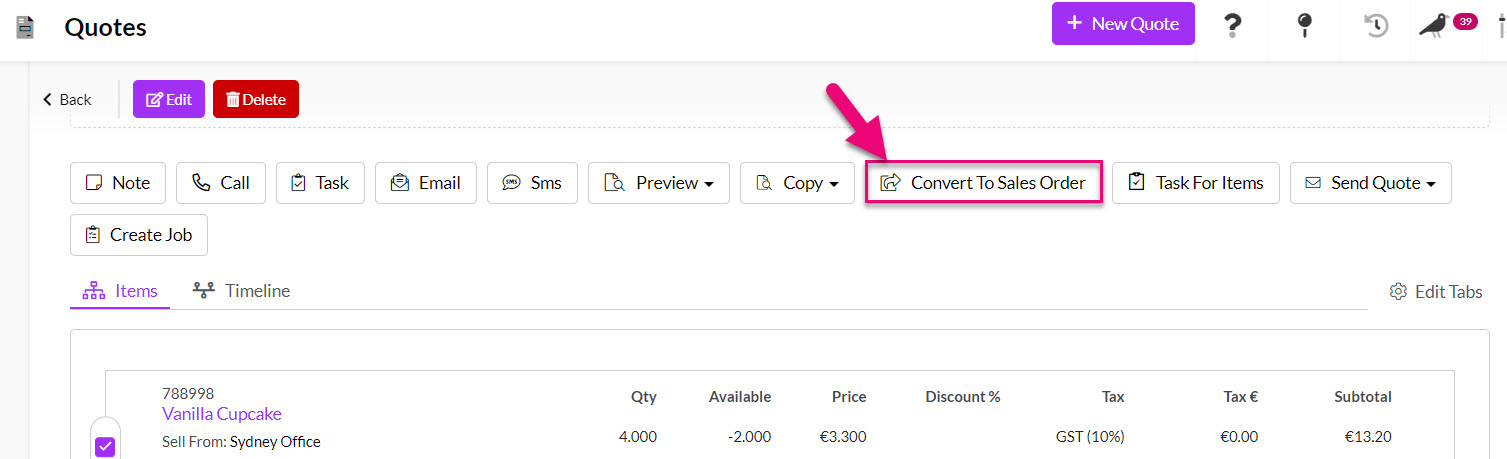
Create the sales order and send the accepted items into stock, purchasing, work and freight without typing the sale again.
See what the customer has bought, been invoiced for or been quoted before while you prepare the new quote. Copy the useful lines, apply today’s price and stock, then send it without rebuilding the order from memory.
The salesperson can answer from the customer record instead of searching old PDFs, emails or accounting entries.
Each quote line stays linked to a real product, service or charge. That keeps pricing, stock, cost, tax, sales history and reporting useful after the quote becomes an order.
Put stock, services, labour, travel, training, installation and freight on the same quote.
Choose the right size, colour, model or capacity and keep the correct SKU, price and stock.
Guide the salesperson through products with options, kits and packages without relying on memory.
Sell the same stock under names that make sense to different customers or markets.
Quote the finished result, then pass the accepted parts and options into the work needed to make it.
Keep the quote simple while Tall Emu keeps the required stock tracking attached through picking and delivery.
Combine setup, products, support, hire, maintenance or repeat billing in one sale.
Apply the right customer price automatically and know the expected margin before you send.
Start from products and services you sell often, then change the quote for the customer.
Give the customer the delivered price before they call the next supplier.

Simple quotes can use simple lists. Sometimes pictures help. Other sales need a full proposal with scope, options and terms to get the deal done.
A clear list of products, services, prices and freight. Add product images and formatted descriptions when they help.
Explain the scope, choices, images, terms and price in one branded online proposal.
Use your logo, colours, wording and terms. Send a live online quote, a formal PDF, or both by email or SMS.
Let the customer ask questions, accept the terms, sign, pay a deposit or pay in full online.
For longer sales, keep the people, stage, calls, meetings, notes, quotes and next steps together. Use a board view to see where each sale is up to, and set security so salespeople only see their own leads when needed.
Manage the classic stage-based sales pipeline and keep more than one quote with the same sale.
Record, transcribe and sum up calls, then turn promises into follow-up tasks.
Sum up the sale, suggest the next step and help write emails and text messages.
Create the next task, send reminders and keep good quotes moving without relying on memory.
Track quote value, acceptance, conversion, pipeline, margin, follow-up and sales targets.
The accepted quote creates the sales order with the same customer, products, prices and freight attached to the work that follows.
Invoicing and payment can happen at the stage that suits the sale, whether that’s before work starts, in progress or after shipment.
Tall Emu is built and supported in Australia, with help available from 9am to 5pm Sydney time.
MYOB or Xero stays as your accounts. Tall Emu handles the leads, quotes, orders, stock, warehouse and customer work around it. Tall Emu and MYOB · Tall Emu and Xero
Common questions
Yes. Tall Emu shows available stock at the chosen location and lets you add a freight price while you build the quote, so the customer gets one complete delivered price.
Yes. Import your customers, products and prices from MYOB or Xero, then quote and sell in Tall Emu. Quotes and sales orders stay in Tall Emu; the invoice syncs to your accounts.
Yes. Send a branded online quote or PDF so the customer can review it, ask questions, accept, sign and pay online.
Yes. Salespeople can see cost, selling price and expected margin before the quote is sent, while permissions control who can see cost or change the price.
The accepted items become a sales order and flow into stock, purchasing, work orders, freight, invoicing and payment without typing the sale again.
Use a direct quote, a sales pipeline or a direct order. Tall Emu keeps the customer, products, price and work connected either way.
Prefer to talk? Call 02 9299 9959 or talk to a real person.