Customer price type or level
Create as many price levels as you need, such as Gold, Silver, Bronze, trade or retail. Assign the right level to the customer and Tall Emu uses it automatically.


What the salesperson needs
Get both answers right while the order is being taken. Customer-specific pricing and live stock across every location mean the price and the promise are correct the first time.
What is my price, and can you supply it?
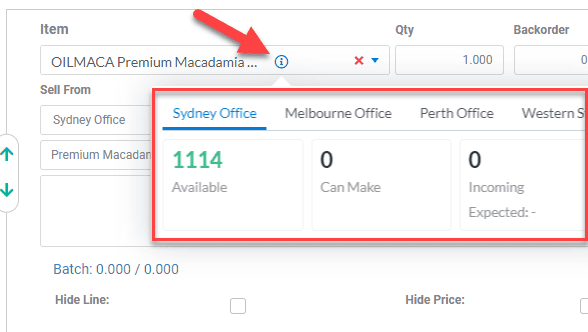
Tall Emu brings customer pricing and live stock into the same Sales Order conversation. No more yelling down to the warehouse or checking with the sales manager. Set up as many pricing levels as you need, along with quantity breaks and customer-specific product prices. Tall Emu applies them automatically wherever you deal with that customer, especially when taking an order. Salespeople don’t need to remember that one customer gets another 3% off or a negotiated price on a particular product. CRM applies it for them.
Set the pricing rules once. Tall Emu uses them automatically whenever you quote or sell to that customer.
Create as many price levels as you need, such as Gold, Silver, Bronze, trade or retail. Assign the right level to the customer and Tall Emu uses it automatically.
Override the normal price level for products where you’ve negotiated a special customer price.
Set different prices at different quantities, so the correct break is applied as the order quantity changes.
Use the right price for the branch, store or supplying location where your business needs it.
Keep the customer’s agreed selling currency with their account and use it when the order is entered.
Apply agreed discounts or promotional pricing without relying on the salesperson to remember them.
Allow authorised staff to adjust a price when needed while keeping normal pricing automatic for everyone else.
Let authorised users see cost and margin before they commit the business to the sale.
See what is on hand, what is already committed, what is incoming and what is backordered before you promise a delivery date. The same stock position then moves into allocation, picking and shipment.
Where is the stock, how much is available and what other demand exists?
What can I promise this customer now, from which location, and what will remain outstanding?
When the full quantity is not available, the representative can agree whether to wait, supply part now, use another location or retain a backorder.
Connect customer pricing, stock and location decisions inside the Sales Order.
Prefer to talk? Call 02 9299 9959 or talk to a real person.