Your stock figure is only as good as the warehouse process behind it
Receipts are entered late.
Sales sees stock that is still on a truck or stock that arrived but has not been checked.
Forget the spreadsheet - warehouse steps update stock as they happen, not at the end of the week.
Picked stock still looks available.
The physical movement happens before the system catches up.
Packing and freight sit outside the order.
Customer service can’t see what was packed, when it left or how it was sent.
Stocktakes find the same problems again.
The count corrects the number, but the daily process that caused it stays the same.
Stock stays right when each warehouse step updates the next
A stocktake can fix a number. It can’t fix the way stock is received, moved, picked, packed, returned or transferred. Those steps need to update stock as they happen.
Pick, pack, ship - each step confirms the one before it, so errors surface early instead of at the customer.
Receiving
Check incoming stock and record what actually arrived.
Tall Emu connects warehouse work to the rest of the business
Customer and supplier records
Sales and purchase orders
Inventory and locations
Serials, batches and expiry dates
Freight bookings and tracking
Photos and evidence
Accounting and reporting
Receive what actually arrived, not only what was ordered.
Check quantities, products, condition, serials, batches and expiry information as stock enters the business.
The receiving process
Match the delivery to the purchase order or expected receipt
Count what actually arrived
Record shortages, over-deliveries or substitutions
Capture serial, batch or expiry details where required
Photograph damage or packaging condition where useful
Move accepted stock into the next warehouse step
Why it matters
Errors found at receiving are easier to resolve than errors found during picking
Good receiving protects stock accuracy and supplier accountability
Clear evidence helps with damaged or short deliveries
How Tall Emu helps
Purchase order and receipt connection
Barcode scanning
Serial and batch capture
Photo capture through compatible mobile devices
Receiving status and stock updates
Put stock where the next person can actually find it.
Move received products into clear warehouse locations, bays, bins or shelves.
The putaway process
Identify the received product and quantity
Choose or confirm the destination location
Move the stock
Scan or confirm the source and destination
Update the system so the stock can be found
Flexible control
A small operation may use simple named locations
A larger warehouse may require aisle, bay, level and bin structure
Some businesses may require destination scanning
Others may prefer optional location confirmation
How Tall Emu helps
Multiple warehouse locations
See stock by location and bin
Mobile scanning
Transfers and stock movement history
Pick the right item, the right quantity and the right stock.
Guide staff through customer orders while controlling locations, serials, batches and substitutions.
The picking process
Release the order or shipment for picking
Show the products, quantities and locations
Scan or confirm each item
Capture serial or batch information where required
Record shortages or exceptions
Move the completed pick to packing
Different picking methods
Single-order picking
Batch or wave picking
Zone picking
Paper-based picking with later confirmation
Mobile scan-driven picking
How Tall Emu helps
Order-linked pick work
Barcode scanning
Location guidance
Serial and batch control
See progress and exceptions
Confirm what is in the carton before the label goes on it.
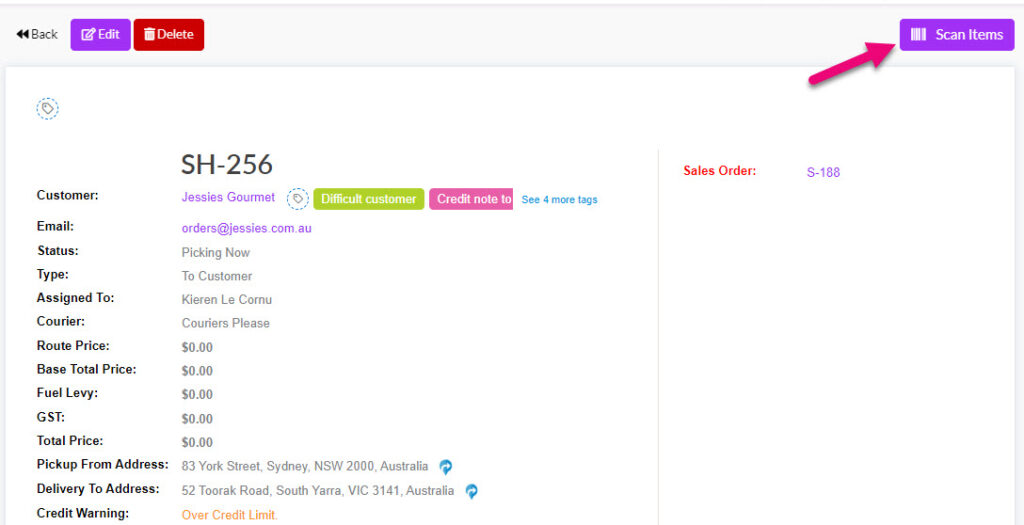
Check the picked goods, capture shipment details and create evidence before dispatch.
The packing process
Open the order or shipment
Capture serials where simple serial tracking is used
Record cartons, dimensions and weight where required
Take photos of the packed order where useful
Prepare the shipment for freight booking
Why packing control matters
It is the final chance to catch the wrong item or quantity
Photos can help with damage or packing disputes
Accurate dimensions and weight improve freight quoting
Serial capture at packing links the exact unit to the customer
How Tall Emu helps
Order and shipment view
Scanning and quantity confirmation
Simple serial capture
Photo capture
Connection to Freight Hub
Book, label and track the shipment from the order.
Move from a packed order to a carrier booking without re-entering the same details.
The shipping process
Request freight quotes where supported
Select the service
Book the shipment
Print the carrier label
Manifest or book pickup where required
Store tracking against the order
Tall Emu Freight Hub
Direct carrier accounts
Freight brokers and aggregators
Quotes, bookings, labels and tracking
Provider-specific features such as manifests and pickup booking
Provider examples
Australia Post
NZ Post
TNT/FedEx
BigPost
Transdirect
MachShip
Shippit
Others
Count stock without stopping the whole warehouse.
Use regular counts to validate the process, identify problems and correct genuine differences.
Stocktake approaches
Full physical stocktake
Cycle counts by location or product group
Targeted counts after a discrepancy
Blind counts where the expected quantity is hidden
Recounts and approval of adjustments
What differences can reveal
Receiving errors
Incorrect putaway
Unconfirmed picks
Returns not processed
Damage or write-offs not recorded
Theft or unauthorised movement
How Tall Emu helps
Mobile counting
Location-based counts
Barcode scanning
Adjustment history
Serial and batch validation where applicable
A return is a stock decision, not only a customer service note.
Receive the item, verify its identity and decide whether it returns to saleable stock, quarantine, repair or disposal.
The returns process
Link the return to the customer and original order
Inspect the condition
Take photos where useful
Choose the return outcome
Update stock, replacement, credit or service activity
Possible outcomes
Return to saleable stock
Quarantine
Repair or service
Return to supplier
Write-off or disposal
Replacement shipment
How Tall Emu helps
Customer and order history
Serial verification
Photo evidence
Stock status and location changes
Follow-up tasks or service activity
Know what left, what is in transit and what arrived.
Move stock between warehouses or locations with clear source, destination and responsibility.
The transfer process
Create the transfer
Pick the stock from the source
Record serials or batches where required
Dispatch the transfer
Track in-transit stock
Receive and confirm at the destination
Why transfer control matters
Stock should not appear available in two places
The destination needs to know what is coming
Shortages and damage need to be identified
Serial and batch history must remain intact
How Tall Emu helps
Multiple warehouses and locations
Source and destination records
Transfer status
Mobile scanning
Serial and batch continuity
Warehouse management questions
Can we run more than one warehouse?
Yes - multiple warehouses and locations with transfers tracked in transit, so the source, destination and stock in between are all visible.
How do returns work?
Returns come back through a controlled process - inspected, restocked or written off, with serial and batch identity intact and the customer record updated.
Do stocktakes stop the warehouse?
Counts can run by section with variances reviewed before committing, so the floor keeps moving while accuracy improves.
Record each stock movement when it happens
Tall Emu helps the warehouse and the rest of the business work from the same information.