Keep your attention on the customer
Automatic call logging, call transcription and AI summaries reduce the information your team has to retype when recordings are available.

Tall Emu + MaxoTel
MaxoTel captures the conversation. Tall Emu connects it to the customer, their sales and the work happening across your business.
For manufacturers, wholesalers and distributors: less call admin now, and more to learn from every conversation you keep.


Loved by Australian and New Zealand customers





Value now
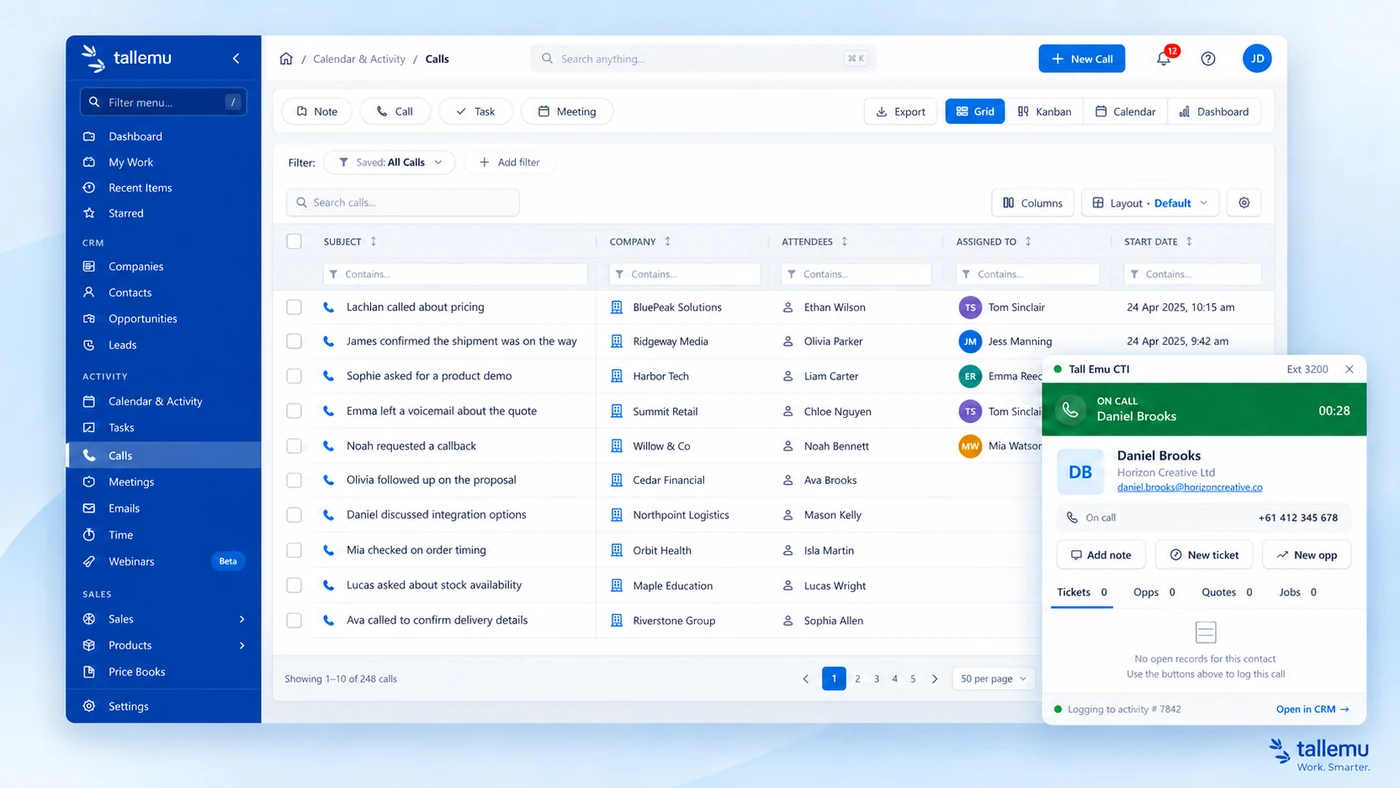
Tall Emu integrates with MaxoTel to match callers to customers and contacts, bring up their records and log calls automatically. Where recordings are enabled and available, Tall Emu can retain the recording, transcribe the conversation and create an AI summary.
That's the immediate value of the MaxoTel CRM integration: your team has the customer context while they're talking, and a useful record when they hang up.
From the first ring to the next step
MaxoTel handles the call. It might be about a quote, stock availability or a manufacturing lead time.
When the number matches a customer or contact, Tall Emu can bring up their record and previous activity.
Your team can see what's already happened and focus on the customer, with less manual note-taking.
The call is logged. Where recording is enabled and available, the recording, transcript and summary can stay with the customer.
See what was discussed and what needs doing. Call outcomes can help create follow-up tasks and reminders.
Automatic call logging, call transcription and AI summaries reduce the information your team has to retype when recordings are available.
A production question, revised quote or delivery concern has context. Keep agreed actions visible alongside the customer and their work.
Sales, service and operations can see previous conversations alongside emails, quotes, orders and jobs. The history belongs to the business.
The backstory
A manufacturer hears about a product problem. A wholesaler hears the same stock question all week. A salesperson learns exactly why a prospect won't commit.
Businesses have always had valuable conversations. Turning them into something the whole business can use has been the hard part.
Neither is a handwritten note, a half-finished CRM entry, an email after the call or something only one person remembers.
MaxoTel and Tall Emu give those conversations somewhere useful to live: with the customer and the activity around them.
Now the information has a chance to do more than help with one call.
Value later
A complaint. A product request. A sales objection. A question about stock or production lead time. A reason someone didn't buy. A service issue your team keeps explaining.
Individually, these sound like everyday conversations. Collectively, they can reveal patterns.
What this customer needs, what's been discussed and what should happen next.
More examples to compare. Repeated questions and concerns become easier to investigate.
A growing body of customer interaction data to search and analyse for recurring themes and changes over time.
The calls don't disappear. They accumulate. That's where Tall Emu's built-in AI becomes much more useful.
A growing history. More to learn.
A transcript of yesterday's call is useful. A searchable history of hundreds of customer conversations is something else entirely.
Tall Emu's built-in AI can help you dig into captured conversations and look for patterns across the wider customer history. Instead of opening calls one by one, investigate the questions that matter to your business.
Use what you find: investigate product issues, demand signals and customer concerns.
Use what you find: review demand, stock decisions and recurring delivery issues.
Use what you find: focus follow-up and understand where prospects get stuck.
Use what you find: spot repeated problems, unmet demand and patterns worth acting on.
What you can investigate depends on the conversations and business data you've captured. These aren't fixed reports - they're examples of the questions you can explore using your data.
The questions hiding in your phone calls
Bring a business question to the history you've kept. For example:
From a factory's lead-time enquiries to a distributor's delivery calls, everyday conversations can give you a better starting point for decisions.
Calls + the rest of Tall Emu
Tall Emu already holds information about customers, opportunities, quotes, orders, stock, manufacturing, jobs and other business activity. MaxoTel adds another valuable source of context: what your customers are actually saying.
A manufacturer can keep a discussion about product requirements beside the customer's work. A wholesaler can understand the request behind a stock enquiry. A distributor can see the conversation behind a delivery concern.
Phone conversations + customer history + sales + operational data + AI analysis
Your team can act in the same business system, with the context available as work moves through quotes, orders, inventory, purchasing, manufacturing, jobs and freight.
Tall Emu is Australian-built business management software for manufacturers, wholesalers and distributors. Customer conversations become more useful when they live beside the sales and operational information your team uses every day.
Your accounts stay in MYOB or Xero. Tall Emu brings together the work around them.
The MaxoTel CTI integration needs an active MaxoTel service. Setup includes enabling MaxoTel in Tall Emu, entering the API key, configuring the webhook and mapping phone extensions to users. Recording availability depends on your phone service and configuration.
Read the MaxoTel setup guide · More about business phone system integration
Common questions
Yes. Tall Emu's MaxoTel CTI integration connects phone activity with customers and contacts, keeping customer call history alongside sales and operational activity.
When the calling number matches a customer or contact, Tall Emu can bring up their record so your team can see who is calling and the relevant customer history.
Yes. Calls can be logged automatically against the relevant customer or contact when the integration is configured. Your history doesn't depend on someone entering a note after every call.
Yes. Where MaxoTel call recording is enabled and the recording is available to Tall Emu, it can retain the recording and create a transcript and AI summary against the relevant record.
Yes. Tall Emu's built-in AI can help analyse captured conversations individually or across a wider history. You can investigate recurring questions, objections and issues. Results depend on the information captured; the example questions on this page are not pre-built reports or dashboards.
Calls can sit alongside emails, notes and other customer activity. Team members with access to the relevant records can review that shared history. Recordings and transcripts are available where they have been captured and retained.
Tall Emu brings customer conversations and operational work into the same business system. Your team can use the customer history while working on quotes, orders, stock enquiries, manufacturing and jobs.
Yes. Tall Emu works with MYOB and Xero. Your accounts remain in your accounting software, while Tall Emu handles the customer, sales, stock and operational work around them.
Tall Emu can use the call outcome to help create tasks and reminders. The conversation and customer context help your team understand what was agreed and what needs doing next.
Make each call more useful now. Build a history that helps you understand and run the business over time.