Call sales todayAU: 02 9299 9959NZ: +61 2 9299 9959

Order management software

Bring every customer order into one place.

Over the phone, through an online store, in your branded Customer Portal or from a repeat order.

★★★★★4.2/5from 41 Capterra reviewsCheck the reviews
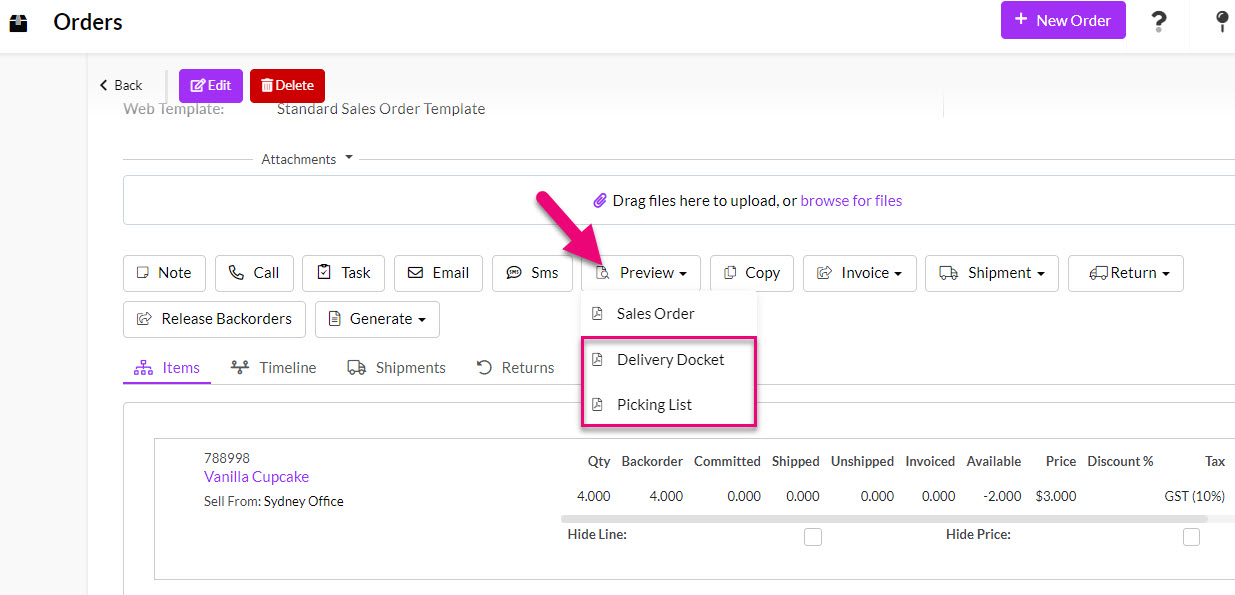
Tall Emu Sales Order with options to create a delivery docket or picking list
Tall Emu Works WithMYOBXero

Loved by Australian and New Zealand customers

  • The SaaS Awards winner 2025
  • The Cloud Awards winner 2023-24
  • Google Reviews
  • Capterra
  • GetApp

How do customers place orders with you?

Some customers call a representative who knows their account. Some buy through an online store. Regular customers may prefer a private portal with their own prices. Others simply repeat the same order as last time.

Maybe more importantly, how do you want customers to order from you? Tall Emu provides a number of options depending on how you work right now, along with tools to help you expand in future.

Phone, email and account reps

Our team takes the order

Hi, it’s Dave from Smith Engineering. Send another two boxes of the filters we bought last month.
  • See the customer, history and open business
  • Apply their pricing and payment terms
  • Check current stock and locations
  • Take the order without forcing a sales pipeline

Explore representative order entry

Online stores

Customers buy online

The customer orders through WooCommerce, Shopify, Magento, Wix or Squarespace.
  • Bring online orders into the system that runs the order
  • Keep products, stock and customers connected
  • Move orders into fulfilment and accounting
  • Manage online and direct channels together

Explore ecommerce selling

B2B self-service

Regular customers use our portal

The customer logs in, sees their price and current stock, then places the order themselves.
  • Branded B2B self-service
  • Customer-specific pricing
  • Orders, quotes, invoices and payments
  • Tickets, jobs and account history

Explore the Customer Portal

Are you mostly an order taker?

The customer already knows what they want. My job is to enter the right products, use the right price, confirm what we can supply and get the order moving.

If your customers just call in and place orders, you don’t need to run them through quotes or pipeline. Tall Emu helps order takers get orders in and out the door quickly.

The order taker needs speed

  • Find the customer quickly
  • See previous orders and common products
  • Apply the correct price
  • Check stock and delivery location
  • Save the order and move on

The business still needs control

  • Credit limits and credit stop
  • Margin and discount permissions
  • Backorders and part supply
  • Deposits and account terms
  • Warehouse, freight and accounting handover

Explore order entry for regular customers

What does the person taking the order need to know?

Who is the customer?

Contacts, delivery addresses, account owner, notes, communications and service history.

Explore customer context

What price do they receive?

Price type, special prices, quantity breaks, discounts, currency and pricing permissions.

Explore pricing

Should we release it?

Account balance, payment terms, credit limit, overdue position and credit stop.

Explore credit control

What was promised?

Calls, Notes, tasks, emails, SMS and customer follow-up tied to the transaction.

Explore communication

Several ways to sell online

Ecommerce store

Use WooCommerce, Shopify, Magento, Wix or Squarespace as the storefront.

Explore ecommerce

Customer Portal

Give known customers private ordering, their own prices, stock visibility and account documents.

Explore the portal

Instant Buy

Use a focused buy-now form or link for a specific product, service, event or campaign.

Explore Instant Buy

What happens after the order is placed?

Everything is available

Release the Sales Order into picking, packing, freight, shipment, invoice and payment.

Explore fulfilment

Only part is available

Ship the available quantity, retain the remainder and keep the customer informed.

Explore partial supply

The customer pays a deposit

Record the deposit against the sale and continue to final delivery and invoicing.

Explore deposits

The customer pays as work progresses

Support staged payments for projects, manufacturing and longer delivery cycles.

Explore progress payments

The product must be made

Carry the Sales Order into work orders, purchasing, production or customer-specific work.

Explore made-to-order

One order process for every sales channel

1 Customer order
2 Sales Order
3 Stock and credit control
4 Pick, make or source
5 Part or full shipment
6 Invoice and payment

Portal, ecommerce, representative and repeat orders all arrive in the same place. The Sales Order gives everyone one record for stock, credit, purchasing, manufacturing, fulfilment and delivery.

Link purchasing and manufacturing to the customer order

Every Purchase Order and Work Order created to fulfil a sale stays linked to that customer order. Open the sale to see what must be bought or made, or open the supply record to see which sale it supports.

Office and warehouse staff working from the same sales order information
Phone, representative, web and portal orders all use the same workflow. One order record drives the buying, making and shipping.

Each order also shows its percentage fulfilled. At a glance, you can see whether the next action is to buy it, build it or ship it. One sale can have 200 linked Purchase Orders and 30 linked Work Orders, and Tall Emu keeps every one tied to the customer order it supports.

As products arrive or manufacturing is completed, the relationship stays clear. Sales and operations can answer the customer without matching separate records by hand in MYOB or Xero.

Keep the customer informed

Order confirmation is only the beginning. Tall Emu can keep the customer-facing and internal history connected as the order moves through payment, stock, fulfilment and delivery.

  • Branded online Sales Order and PDF
  • Email and SMS templates
  • Portal order status
  • Tasks and calls for backorders or exceptions
  • Delivery dockets and shipment notifications
  • Invoices, payments and account documents

Explore customer communication

Report on which order channels are working

Because the channels, customer, products, orders, fulfilment and financial records are connected, management can report on more than raw revenue.

  • Orders and revenue by channel
  • Sales by representative, customer, product and category
  • Portal and ecommerce adoption
  • Orders awaiting payment or credit release
  • Backordered and partly shipped orders
  • Average order value and repeat-order behaviour
  • Order-to-ship and order-to-invoice performance

Explore selling reports

Australian company. Australian team. Local support.

Tall Emu is built and supported in Australia, with help available from 9am to 5pm Sydney time.

MYOB or Xero stays as your accounts. Tall Emu handles the leads, quotes, orders, stock, warehouse and customer work around it. Tall Emu and MYOB · Tall Emu and Xero

Common questions

Questions business owners ask about sales orders

Does Tall Emu suit businesses that mostly take repeat orders rather than run a pipeline?

Yes. Regular orders don’t need a sales pipeline. Find the customer, apply the right price, check stock and get the order moving.

Can I apply account-specific pricing and quantity breaks to an order?

Yes. Orders can apply the customer's price type, special prices, quantity breaks, discounts and currency, with permissions controlling who can change them.

What happens if a customer is over their limit or on credit stop?

Tall Emu warns when a customer is over their credit limit, outside their payment terms or on credit stop. Credit controls can stop the order moving ahead or prevent a shipment from being generated until the account is cleared.

What payment options can I use on an order?

Use account terms, full payment, a deposit, progress payments or a payment link, depending on the sale.

How does an order reach MYOB or Xero?

Sales orders stay in Tall Emu. When the order is invoiced, the invoice and payment information sync to MYOB or Xero, so the sale isn’t entered twice.

Bring every customer order into one place.

Give representatives, ecommerce customers and portal users one path into stock, fulfilment, freight and accounts.


Prefer to talk? Call 02 9299 9959 or talk to a real person.