
CRM & Business Management Software for Xero
CRM, sales and stock connected to Xero.
Keep customer details, sales activity, quotes and orders together in Tall Emu. Connect your team’s sales and operational work with inventory, purchasing and fulfilment while keeping Xero for accounting.
For Australian and New Zealand manufacturers, wholesalers and distributors.
Tell us how you use Xero and where your current processes get stuck. Our Australian team can discuss how Tall Emu could help.
For Australian and New Zealand Xero organisations. One accounting datafile per Tall Emu connection. Connection details.

Loved by Australian and New Zealand customers





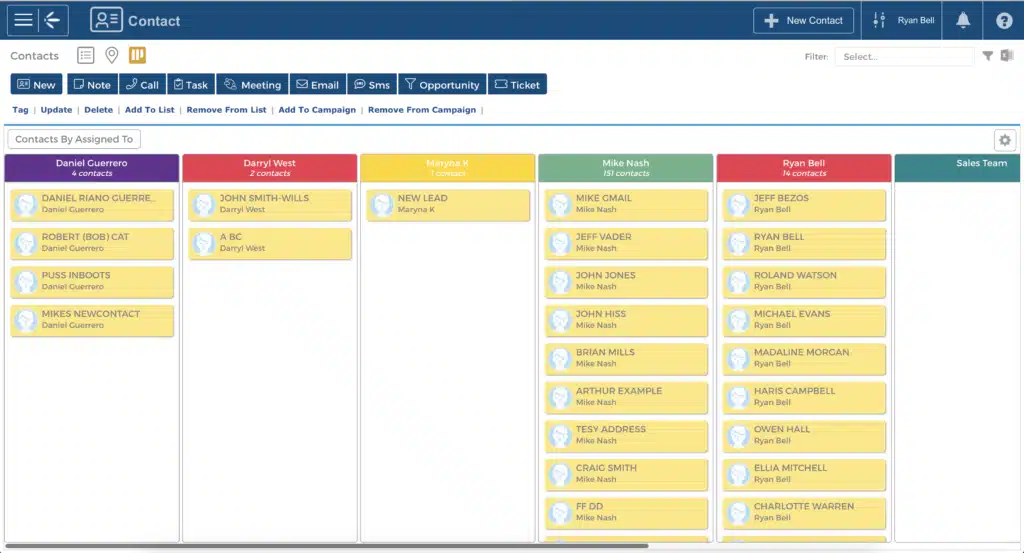
Keep customer conversations, sales activity and orders together.
Keep shared customer and contact records with the history, notes and sales activity your team needs. Spend less time hunting through inboxes when a customer calls or another team member takes over.
- Follow the next sale: manage leads and opportunities through sales pipelines, with an owner and a clear next step.
- Keep follow-ups visible: use tasks, follow-up dates and reminders to help prevent enquiries being forgotten.
- Quote with the customer in view: keep quotes connected to the customer record and the agreed details.
- Hand over with context: see orders and relevant account information alongside customer activity, so sales and operations can follow the same history.
Customer service can see the conversation and the order together. Sales can follow what happens next without rebuilding the story for the warehouse.
A Xero customer’s experience
Xero keeps the accounts. Tall Emu connects the business.
You can be happy with Xero and still need a better way to run orders, stock and fulfilment. Tall Emu gives distributors, wholesalers and manufacturers a connected place to manage that work.
Your bookkeeper continues using Xero for accounting and compliance. Sales and operations use Tall Emu for customer records, leads, quotes, purchasing and the physical movement of products.
Turn agreed quotes into orders the team can follow
A quote in one list and an order in another makes it harder to follow through on what the customer agreed to buy. Tall Emu connects the customer record and sales activity with quotes and sales orders.
Keep the relationship and the order together, so customer service can follow up with the people arranging stock and delivery.
Inventory management with Xero
Use Tall Emu to check stock on hand, stock committed to existing orders and what is still available before confirming supply. Sales and purchasing work from the same stock records instead of maintaining separate spreadsheets.
Inventory management covers multiple stock locations in Tall Emu while Xero remains the accounting system. Agree the opening stock position and accounting settings before using the integration day to day.
Keep sales orders and purchasing connected
When orders outstrip available stock, the team needs to know what has been bought and what is still missing. Tall Emu connects customer orders with supplier purchasing, incoming deliveries and outstanding quantities.
Partial receipts show what actually arrived. That gives sales a clearer basis for answering delivery questions without treating an entire purchase as received.
Warehouse management alongside Xero
Move the work from the office to the warehouse through Tall Emu shipment records. Staff can receive goods, pick items, pack orders and record dispatch, with outbound statuses helping the office follow progress.
Warehouse management with Tall Emu includes stock locations, bay details and barcode picking. These operational tools work alongside Xero and are separate from the accounting data exchange.
Warehouse Mobile is planned as part of a staged rollout. Talk to us about availability for your business before planning a move to mobile warehouse workflows.

Link light manufacturing to stock and orders
For businesses that make as well as sell, Tall Emu connects bills of materials and work orders with the products customers need. Materials and finished goods stay linked to the stock records used by sales and purchasing.
Use manufacturing workflows to follow production against demand, so material requirements and order progress are easier to see together.
Make B2B customer ordering easier
Give trade customers a B2B customer ordering portal for their next purchase instead of asking staff to re-enter every emailed order. The portal uses the customer price level configured in Tall Emu and lets customers view quotes, order status and invoices.
Available features depend on the access and options you enable for each customer.
The updated portal is an optional paid addition to your Tall Emu subscription: $100 per month, billed annually at $1,200, or $135 per month when paying monthly. Prices are in AUD and exclude GST. It is being introduced through a staged rollout; our team can confirm availability. See portal features and pricing.
Connect freight with fulfilment
After packing, use supported freight tools to quote, book and label the shipment and keep tracking connected to the order. Provider capabilities vary.
Tall Emu can also create an invoice for shipped quantities when the relevant shipment invoicing setting is enabled, connecting fulfilment with the financial record sent to Xero.
See how Tall Emu could work with your Xero setup.
Tell us where sales, stock or order processing needs to improve. Our Australian team can discuss your current processes and the setup your business needs.
Tall Emu is a paid business management system. Software subscription, onboarding and optional additions have separate pricing. View Tall Emu pricing.
How the Xero integration works
The documented integration supports the Australian and New Zealand version of Xero. Use a Xero login with the Standard permission role; Invoice Only and Read Only roles cannot populate the required data.
Authorise the connection and select the organisation to import. Tall Emu connects to one accounting datafile at a time. The Xero connection guide explains authorisation and the initial import.
- Contacts and products: starting records import from Xero; Tall Emu sends records needed for financial and stock transactions.
- Quotes and sales orders: remain operational records in Tall Emu, without ongoing sync to Xero.
- Invoices: export when created or updated. Supplier bills: export when created, under the enabled integration.
- Payments: allocated Tall Emu payments export; payments from Xero import periodically, documented as every two hours during business hours.
Records are queued, so the connection is not an instant mirror. Tall Emu is the stock master after setup. Xero needs accounts configured for stock adjustments, supplier payments and supplier refunds used by stock movements.
Check the Xero automatic sync guide with your setup team. Keep operational corrections in Tall Emu and resolve integration errors rather than assuming an edit in either system always updates the other.
Xero integration questions
Can I keep Xero and use Tall Emu for CRM, inventory and orders?
Yes. Keep Xero for accounting and use Tall Emu to connect customer records, sales, inventory and the work needed to fulfil orders.
How does Tall Emu work with Xero?
Authorise the Xero connection, import the starting data and configure the accounting settings. Tall Emu handles daily sales and stock work, with supported financial records sent to Xero.
What information is shared between the systems?
Contacts, products, invoices, supplier bills and payments are among the supported records. Sync rules differ by record type; quotes and sales orders have no ongoing sync to Xero.
Can I manage stock across multiple locations?
Yes. Tall Emu can manage stock across multiple locations, so teams can check where goods are held while retaining Xero for accounting.
Can Tall Emu support warehouse operations?
Yes. Tall Emu supports receiving, picking, packing and dispatch, including barcode picking on outbound shipments. Confirm Warehouse Mobile availability before planning a mobile rollout.
Is Tall Emu suitable for wholesalers, distributors and manufacturers?
Yes. Tall Emu connects sales with stock, purchasing, manufacturing and fulfilment for Australian and New Zealand businesses that sell, make or ship products.
Can I manage quotes, orders and stock in Tall Emu?
Yes. Tall Emu manages quotes, sales orders, stock, purchasing and fulfilment. Xero remains your accounting system.
Do quotes and sales orders sync into Xero?
No. Quotes and sales orders are managed in Tall Emu and do not have an ongoing sync into Xero. Supported financial records, such as invoices and supplier bills, export through the enabled integration.
How do we get the integration set up?
Contact our team to discuss your accounting file, starting data, stock locations and workflows. Setup includes authorising the connection, importing starting records and configuring the accounting and sync settings. See the Xero connection guide.
Where can I see pricing or arrange a demonstration?
View Tall Emu pricing, watch a demo or contact our team to discuss a demonstration for your business. The updated B2B Customer Portal is an optional paid addition.
Australian company. Australian team. Local support.
Tall Emu is Australian owned, built and supported here, with help available from 9am to 5pm Sydney time.
Your bookkeeper can keep using Xero. Your sales and operations team gets one connected place to run the rest of the business.
Connect your customer, sale and order with Xero.
Tell us how you use Xero and where your current processes get stuck. Our Australian team can discuss how Tall Emu could help.
Tall Emu is a paid business management system. Software subscription, onboarding and optional additions have separate pricing. View Tall Emu pricing.