CHANGE THE WAY IT LOOKS
Put the right things on screen.
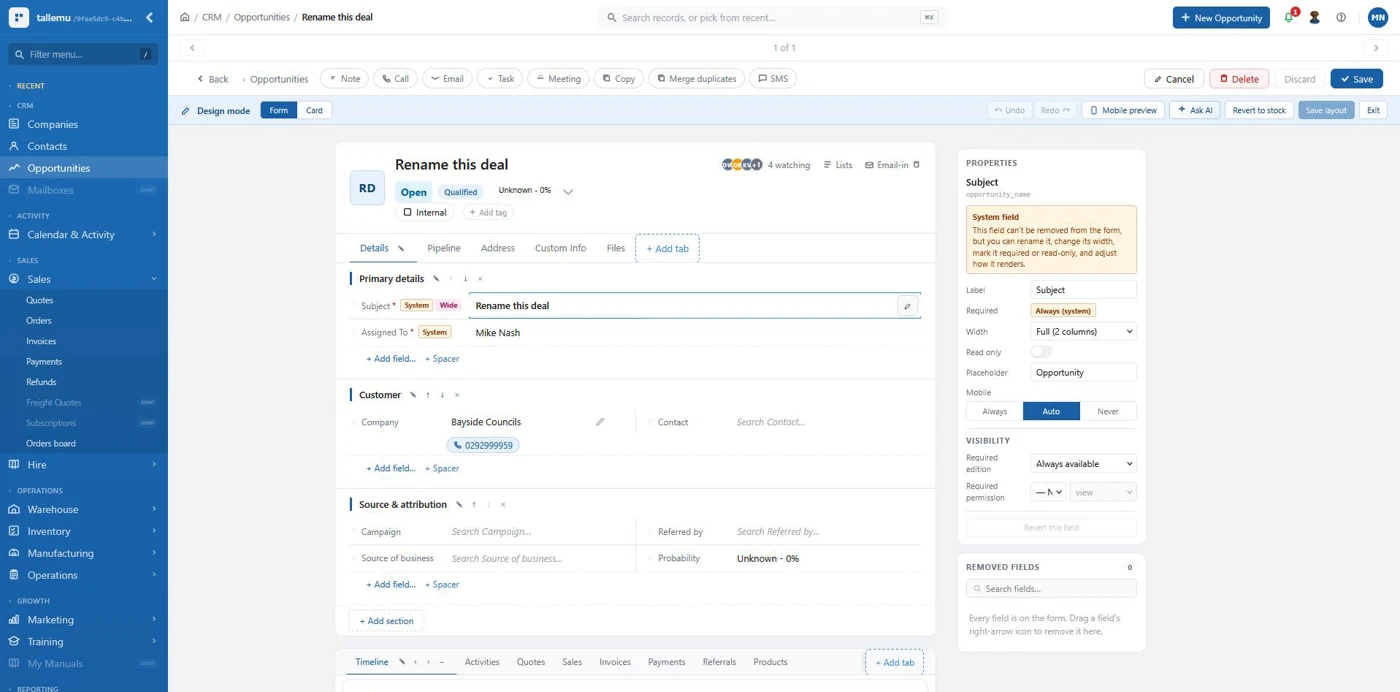
Give sales, warehouse and service teams the fields, records and screens they actually need.
Screens · Fields · New records


Tall Emu's been built to be easy and fast to customise. Need a new screen, an integration or a better way to run a process? Our experienced team uses a proven platform, purpose-built tools and AI to get valuable changes done without starting from scratch.
Make everyday changes yourself, or ask the people who build and support Tall Emu to do it for you.
Loved by Australian and New Zealand customers





The day-to-day essentials are already there: customers, quotes, sales orders, purchasing, stock, manufacturing, warehouse and shipping. You're building on a working business system, not an empty canvas.
And our team knows how it all fits together. We'll use the proven parts of Tall Emu, then build around the things that make your business different.
Tall Emu was designed from the start to make customisation straightforward. New screens, records, integrations and processes can build on what's already there, instead of starting from scratch.
Our technology gives us a head start. AI helps our experienced team design, develop and test faster. That can reduce development time and cost. The scope, complexity and testing needed will determine the delivery plan.
Either way, we'll help you get something useful done.
Give sales, warehouse and service teams the fields, records and screens they actually need.
Automate handovers, reporting and approvals. Stop copying information from one system into another.
A special pricing tool, a custom integration or an AI assistant for your own processes. We'll help turn a good idea into something useful.
Make everyday changes yourself. For deeper customisation and integrations, our team can help.
Move fields, organise tabs, add your own information and give people the view they need for their job. No more training everyone to ignore half the screen.
Need an equipment register, installation record, sample request or something that's unique to your business? Add records and relationships that fit the work you do.
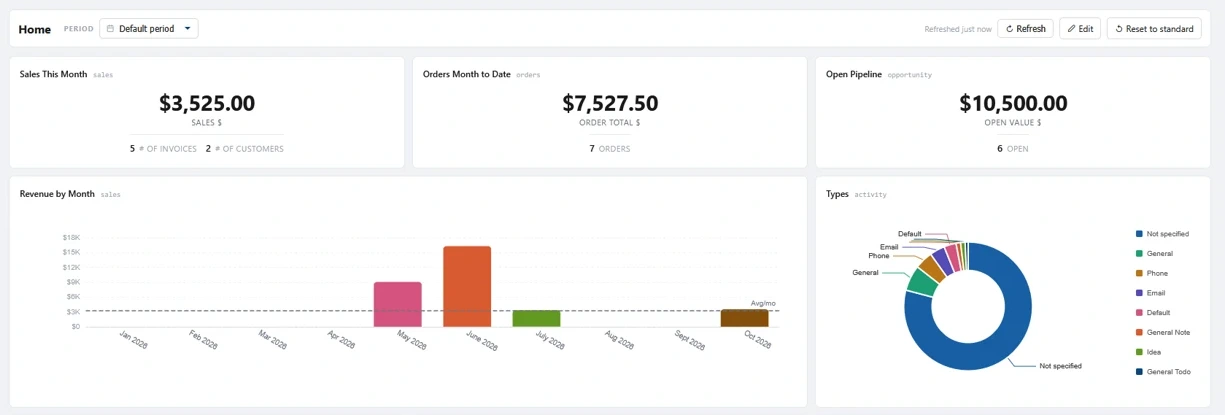
Build reports and dashboards around your own sales, stock, jobs and performance measures. Get answers without exporting another spreadsheet.
When something happens, Tall Emu can create tasks, update records, notify the right people and keep things moving - without someone remembering every step.
Connect your store, supplier or specialist application to Tall Emu. Our team can build a connection for the systems your business already relies on.
Here's the sort of valuable work our team can help with.
Turn measurements, product choices and pricing rules into a quote without another spreadsheet.
Send unusual discounts and orders to the right person, then keep the process moving.
Track the information that's unique to your business and make it visible to the team.
Get customer, stock or order data moving between Tall Emu and the software you already use.
Have AI help with the work your team really does - like sorting enquiries, reading paperwork or preparing the next action.
Build a focused screen or workflow for sales, warehouse, manufacturing or service - without replacing the rest of the system.
The Tall Emu team has years of experience building business software and helping businesses put it to work. We know our platform, how its parts fit together, and where a custom change can make a real difference.
We'll help you design the right approach, build what you need and support the result. It's our platform and our team doing the heavy lifting - not a custom system you're left to figure out on your own.
Tell us where time is being wasted, where work gets stuck, or what the team needs to do better.
We start with existing Tall Emu functionality and extend it where the value is.
Our team scopes and builds the work, then agrees how it will be maintained and supported. Custom development or implementation may be scoped and quoted separately.
Yes. You can configure screens, add fields and records, and set up many everyday reports and automations. Our team can help with setup or take care of it for you.
Yes. We can scope custom integrations, automations, tailored screens, business-specific processes and AI software development, using Tall Emu as the starting point.
No. Some tools are part of Tall Emu, while custom development and implementation work is scoped and quoted separately. We'll explain what you can configure yourself and what needs development.
Our experienced Tall Emu team builds and supports the platform. We'll agree how each custom solution will be maintained and supported as part of its scope.
Tell us about the process, problem or idea you have in mind. We'll help work out what you can configure yourself and where our team can help.
Loading enquiry form...
The enquiry form could not load. Please contact our team to share your ideas.